- Optimizely Feature Experimentation
Global holdouts help you accurately measure the true impact of your A/B testing and experimentation efforts. You designate a small percentage of users as a control group, ensuring they do not experience any experiments or new feature rollouts. This lets you directly compare outcomes between users who experience variations identified as winners during A/B tests and those who only see the default “off” variation for feature flags in your project. This approach lets you quantify the cumulative impact of your testing program, answer critical questions from leadership about the value generated, and make informed decisions about future product and marketing strategies.
A/B testing optimizes products and enhances user experiences, but proving its value can be challenging without a clear measurement of the overall uplift generated. Quantifying its revenue impact remains difficult, as measuring contributions over a quarter or year often requires manual calculations and complex workarounds.
Global holdouts solve this problem by setting aside a small percentage of their user traffic (typically up to 5%) as a control group. These users are not exposed to any A/B tests or feature rollouts, ensuring a clean baseline for comparison. The holdout group only experiences the default product experience as configured in the “off” variation of your feature flags.
Native global holdouts
Optimizely's native global holdouts provide a streamlined way to establish a persistent control group directly within the platform.
How global holdouts work
- Configuration – You create a holdout in the platform, select the environment, define the primary metric to track, and choose the percentage of traffic to hold back. The system warns you if the holdout exceeds 5% of total traffic. The more visitors you withhold from experiments, the time needed to reach statistical significance increases.
- Assignment – Visitors in the holdout group receive the default "off" variation for feature flags, regardless of ongoing A/B tests, targeted deliveries, or multi-armed bandits running on top of your flags.
- Visibility – You can monitor and analyze holdout performance through a dedicated dashboard.
- Results calculation – After experiments conclude and the winning variation for the experiment is manually identified in the application, the platform aggregates data from visitors who saw winning variations to compare against the holdout group. This lets you compare key metrics, such as revenue or engagement, to quantify the uplift generated by experimentation. See how to manually deploy a winning variation.
Create a holdout
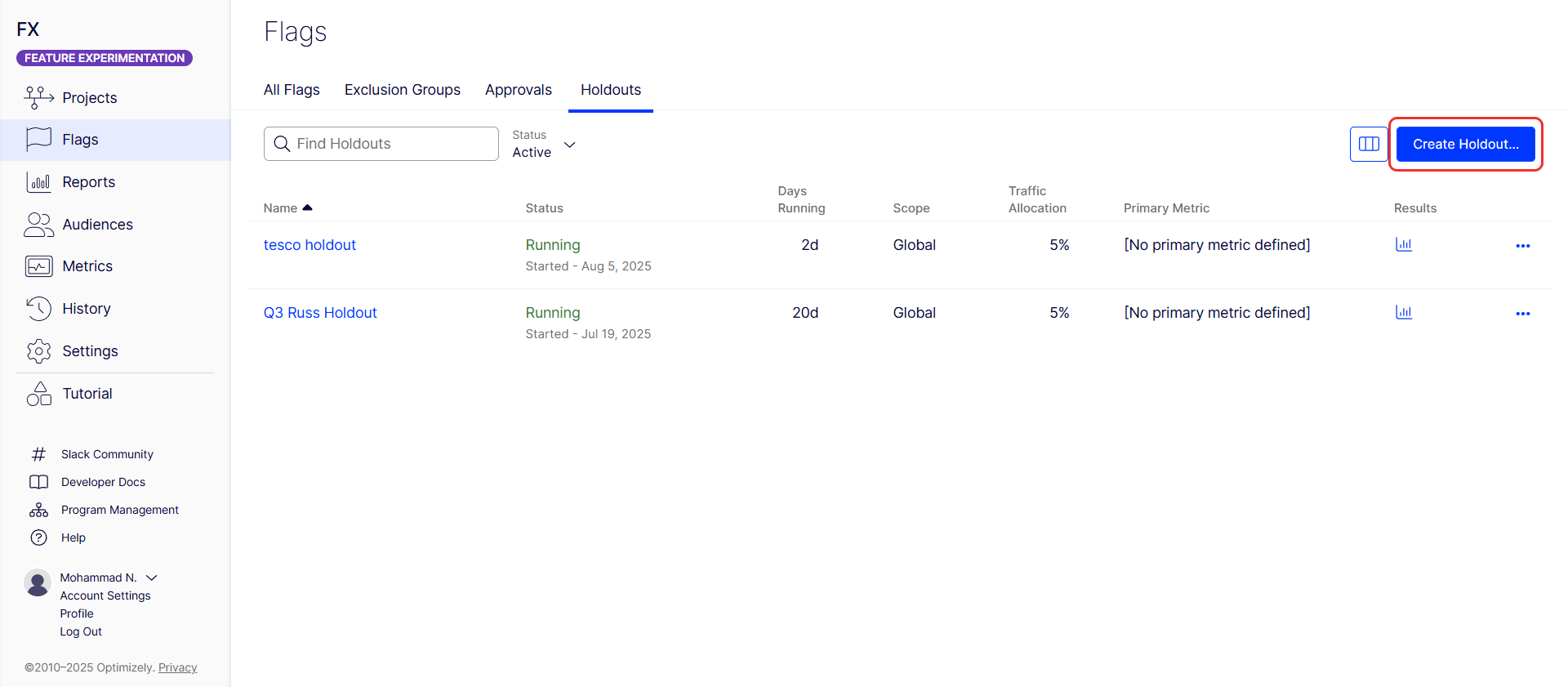
- Go to Flags > Holdouts.
-
Click Create Holdout.
- Enter a unique name in the Name field.
- Edit the Holdout Key and optionally add a Description. Valid keys contain alphanumeric characters, hyphens, and underscores, are limited to 64 characters, and cannot contain spaces. You cannot modify the key after you create the holdout.
- Select the Environment to scope the holdout. Like A/B tests, holdout results are separated by environment.
- Choose the primary Metric. This is usually the main company metric to measure results. Optionally, you can choose secondary and monitoring metrics.
- Set the percentage of traffic to be held back by Feature Experimentation from tests and new features (recommended not to exceed 5%). The system warns you if the holdout percentage exceeds 5%.
-
(Optional) Target a specific audience, although you should apply the holdout to everyone.
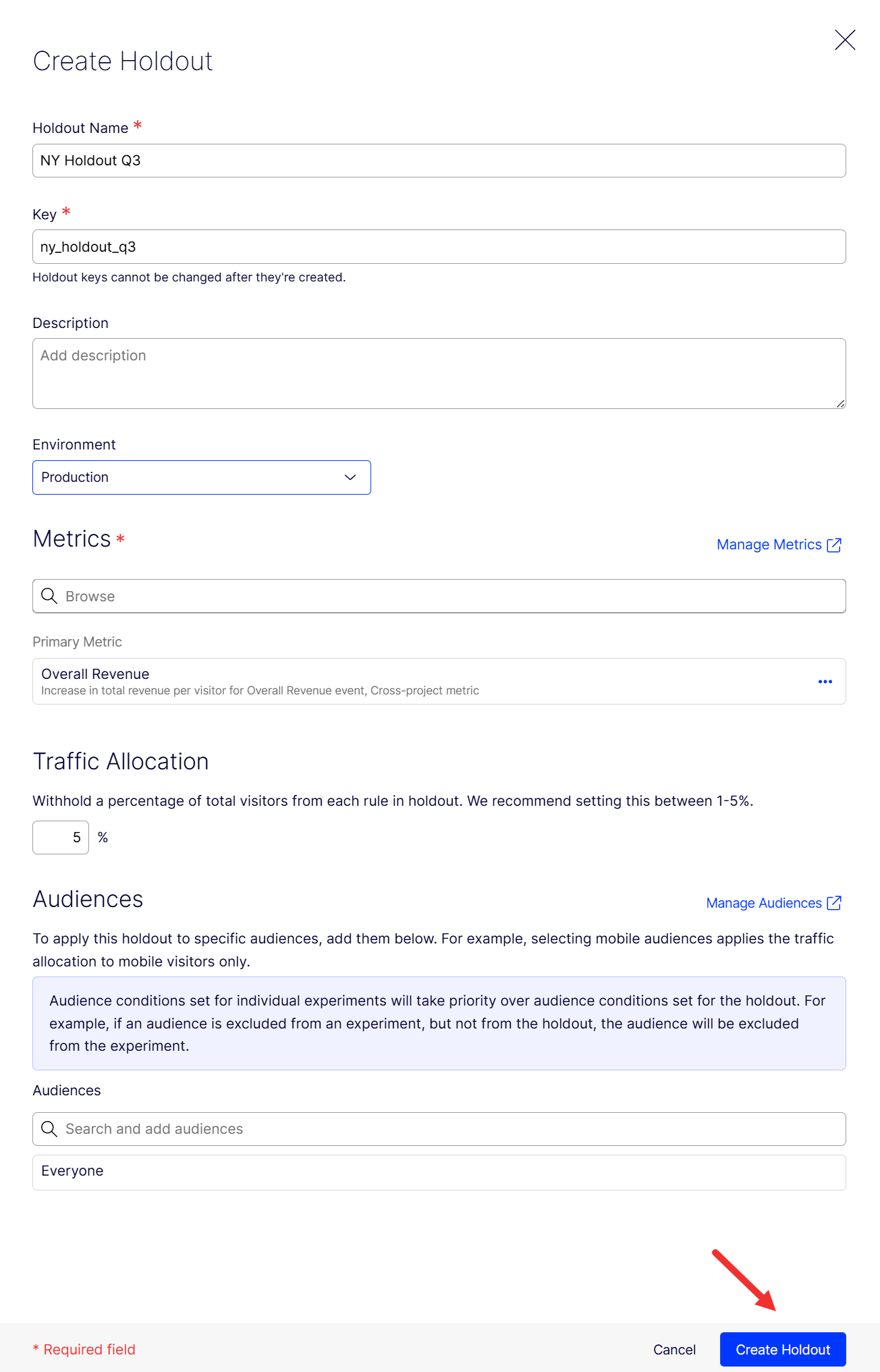
- Click Create Holdout.
Start a holdout
After creating the holdout, it displays in the Holdouts tab, where you can start it.
Click More (...) for the holdout and click Start.
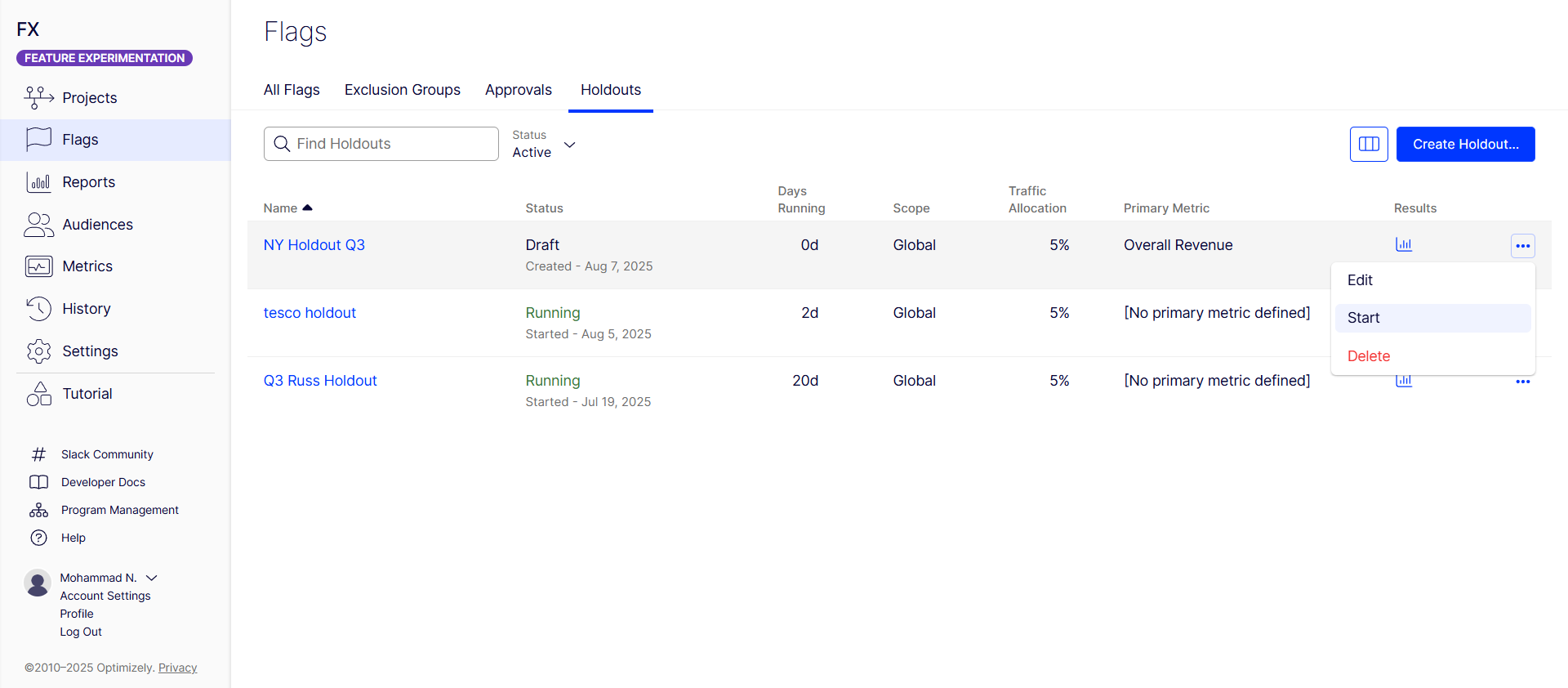
Visitors assigned to this holdout only see the default "off" variation for any flags within the holdout, regardless of any experiments they might otherwise be included in by Feature Experimentation. When you start a holdout, you cannot pause it; only permanently conclude it.
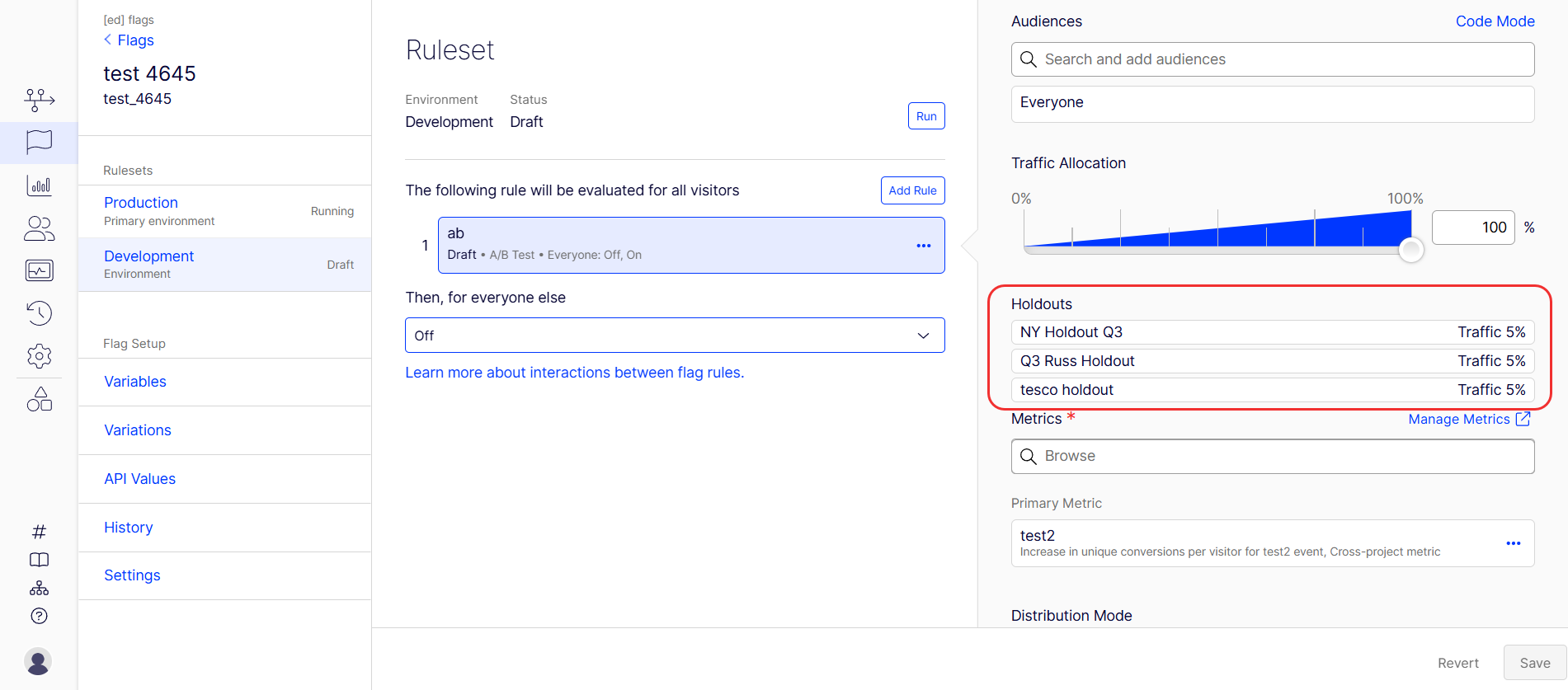
To see holdouts that Feature Experimentation applied to a rule, go to Flags > Environment > Rule. The holdouts applied, along with the traffic allocated, display.
Conclude or delete a holdout
The available actions depend on whether the holdout has started.
- Holdout has not started – Click More (...) > Delete to remove the holdout permanently from the project. The action cannot be undone.
- Holdout has started – You cannot delete a holdout that has started. Click More (...) > Conclude instead. The holdout status changes to Concluded. Every user in the holdout is rebucketed and begins receiving variations from running A/B Tests, Targeted Deliveries, and Multi-Armed Bandits. A concluded holdout cannot be re-enabled.
After a holdout concludes, click More (...) > Archive when it is no longer relevant. Archives preserve the historical results and remove the holdout from the active list. To unarchive a holdout, click More (...) > Unarchive.
The deletion safeguard protects long-running holdout data from accidental loss. For example, a holdout that ran for a quarter cannot be deleted, so its results remain available for review and reporting.
Results calculation
After you conclude A/B tests and identify winning variations, data from these variations is aggregated and compared to the holdout group’s data.
The comparison provides a clear measurement of uplift and the cumulative impact of experimentation, similar to a large-scale A/B test.
Learn how to conclude your A/B test and deploy the winning variation.
You must conclude your A/B test and deploy the winning variation to reflect your experiment results in the holdout analysis accurately. This step confirms the variation is part of the exposed group and includes its performance in the holdout results.
Holdout results compare unique conversions per visitor and the conversion rate of users bucketed in the holdout with those that were exposed to each winning variation, as selected by the customer. The comparison between the In Holdout and Not in Holdout conversion rates generates the confidence interval, statistical significance calculation, and cumulative improvement percentage.
Conclusion
Global holdouts help you measure the success of your experimentation programs by maintaining a persistent control group and providing transparent, actionable results. They empower you to maximize the value of your A/B testing efforts and make data-driven decisions for growth. Additionally, they offer a robust methodology for long-term measurement of product changes and feature rollouts, letting you quantify the value of experimentation and justify investment in A/B testing.
Self-service global holdout
Self-service global holdouts let you define a control group using custom logic, user attributes, and audiences. This approach is flexible but requires more manual configuration.
Self-service global holdout groups are the following:
- Utilized only during a specified timeframe.
- Comprised of a set percentage or a fixed portion of traffic.
- Implemented to assess the cumulative impact of experiments by comparing users in the control group to those in test variants.
Feature Experimentation is stateless and uses deterministic bucketing to make decisions. Because of this, global holdout groups are only directly supported out of the box using the stateless global holdout strategy. You can also define a global holdout with a persistent data store using the stateful global holdout strategy. However, you need a third-party or self-hosted infrastructure to implement this strategy.
Each strategy has its advantages and drawbacks, so evaluating which approach best aligns with your specific needs and architecture capabilities is important. No matter what solution you choose, you must include a default variation on each flag for users in the global holdout group to receive.
Stateless global holdout (recommended)
The easiest way to create a global holdout group is to create a user attribute and audience and add that audience to all experiments.
Pros
- Does not require third-party or separate hosted infrastructure.
- Naturally scales as the user base grows (which can account for seasonality effects).
- Is randomly sampled.
Cons
- Is not static, requiring data analysts to know how the group is defined to determine whether a user is a member.
Example implementation steps
Example 1 – Create a 5% global holdout.
This example uses the last two digits of the user id to determine if the user is in the global holdout.
- Create a user attribute named
lastTwoOfIdthat you can use to determine if a user is in a global holdout group. See Define attributes to create attributes in the UI or the Create an Attribute endpoint in the API reference documentation. - Create an audience named
Not in Global Holdout. See Target audiences for the UI or Create an Audience endpoint. - Drag and drop the
lastTwoOfIdattribute. -
Configure the Audience Conditions drop-down lists to check if the Visitor matches the
lastTwoOfIdattribute where Number is greater than 4.
Users with lastTwoOfId = 00, 01, 02, 03, or 04 do not qualify for the Not in Global Holdout audience, as they are in the global holdout group.
- Add the
Not in Global Holdoutaudience to all experiments using anandcondition with any other audiences you want to target to ensure the experiment considers only users who are not in the global holdout group. - After you pass the data into the user attribute, the previous steps create a global holdout group. Users in that group receive the default variation for each flag because they do not qualify for the
Not in Global Holdoutaudience.
Example 2 – Use a boolean to determine if the user is in the global holdout group.
- Create an attribute named
inGlobalHoldoutthat you can use to determine if a user is in a global holdout group. - Use your own logic at the SDK level to determine if the user is part of the global holdout group and pass
trueas the value for the boolean user attributeinGlobalHoldout. - Add the
Not in Global Holdoutaudience to all experiments using anandcondition with any other audiences you want to target to ensure the experiment considers only users who are not in the global holdout group.
After you pass data into the new user attribute, the previous steps create a global holdout group. Users in that group receive the default variation for each flag because they do not qualify for the Not in Global Holdout audience.
Stateful global holdout
Instead of relying solely on user attributes, the stateful approach uses a dedicated experiment to determine holdout membership and dynamically applies that decision across all other experiments.
You can create a static list of users to comprise a global holdout group. You must persist that data using a third-party or self-hosted data store and pass it into a user attribute.
Pros
- A data analytics team, for example, can statically define the global holdout in advance and does not grow unless edited.
- You can define users in the global holdout group in a way that avoids bias (or introduces it, so be careful).
- It may be easier to query for global holdout membership with a persisted datastore, for example, in a data lake.
Cons
- Third-party or customer-hosted infrastructure is required for persisting global holdout membership, as it is not defined deterministically (on read).
- Developer effort is required to safely expose the static list of global holdout member IDs to all Feature Experimentation SDK implementations, like through an API, and implement the new user attribute.
- Assuming the user base grows while the global holdout group remains static, the global holdout group shrinks proportionally.
Example implementation steps
Expose a static list of global holdouts in a way accessible to all Feature Experimentation SDK implementations. First, create and run an experiment to determine if the user is in the global holdout group. Assign users to an attribute and use this attribute in future experiments to filter out users from the holdout group.
- Create a global holdout A/B test flag. This experiment determines whether a user is in the holdout. Evaluate this flag as early as possible in the user journey (for example, at login or first visit).
- 5% of users are assigned to holdout (do not see any experiments).
-
95% of users proceed as normal (eligible for experiments).
- Run
Global holdout flagbefore any new experiment. Then create an attribute namedeligibleForTestsbased on the global holdout experiment result. Which variation the user receives determines if they are eligible for the experiment.- On variation – User is eligible for experiments.
-
Off variation – User is in holdout and should not see any experiments.
- Create an audience named
Eligible for testsusing theeligibleForTestsattribute as an audience filter.-
Configure the Audience Conditions drop-down lists to check if the Visitor matches the
eligibleForTestsequals on. If the user is in the On variation, they are eligible for future experiments.
-
- Use the
Eligible for testsaudience for any future flags. This audience filters out users who are in the global holdout.
For example, create an A/B test flag rule named experiment_flag that uses the Eligible for tests audience, like the following:
The following JavaScript sample code demonstrates how to call the decide() method on the global_holdout_experiment flag and set the eligibleForTests attribute based on the decision. Then, it retrieves a decision for experiment_flag, which uses eligibleForTests as an audience condition.
const user = optimizely.createUserContext("user123");

/* -- Make decision for global holdout first -- */
const holdoutDecision = user.decide("global_holdout_experiment");

user.setAttribute("eligibleForTests", holdoutDecision.variationKey);

/* -- If eligibleForTests=off for the user, they do not qualify for any experiment audiences -- */
experimentDecision = user.decide("experiment_flag");
Comparison between native Global holdouts and Self-serve options
| Category | Native feature | Self-serve options |
|---|---|---|
| Implementation method | Configured directly within the Optimizely platform UI under Flags > Holdouts. | Configured manually using user attributes and audiences; apply these to individual experiments, possibly involving SDK-level logic. |
| Infrastructure requirement | None; fully managed within the Optimizely platform. |
Stateless – None beyond Optimizely SDK/platform. Stateful – Requires third-party or self-hosted infrastructure for persisting holdout membership data. |
| Holdout assignment | Visitors automatically receive the default "off" variation for any flags in the holdout, regardless of ongoing A/B tests, targeted deliveries, or multi-armed bandits. | Users excluded from experiments by not meeting audience conditions naturally receive the default variation for those flags. |
| Results visibility | Monitor and analyze performance with a dedicated dashboard within the Optimizely platform. | Conduct custom data analysis and querying, potentially from your own data lake, to identify holdout members and compare results. |
| Results calculation | Platform aggregates data from visitors who saw winning variations (after manual identification and deployment) and compares it against the holdout group. | Data analysts manually aggregate and compare data, defining how the holdout group was identified and comparing their metrics against the exposed group. |
| Lifecycle management | Perform explicit "Create," "Start," and "Conclude" actions within the UI. Cannot pause, only permanently conclude. | Manage implicitly through the lifecycle of the experiments and audience conditions that define the holdout. No explicit "start/conclude" for the holdout itself. |
| Customization | Limited to options provided in the UI (for example, traffic percentage, primary metric, optional audience targeting). | High flexibility enables custom logic to define holdout membership (for example, based on user ID digits, boolean attributes, or a dedicated experiment). |
| Holdout group definition | Defined by a percentage of traffic set in the UI. |
Stateless – Defined by a user attribute and audience condition (for example, Stateful – Defined by a dedicated experiment and persisted data. |
| Static vs. dynamic holdout | The holdout group is dynamically sampled based on the configured percentage. |
Stateless – Naturally scales as the user base grows, randomly sampled. Stateful – You can statically define a holdout group in advance, but it may shrink proportionally if the user base grows and the holdout remains fixed. |
| Developer effort | Minimal for setup; primarily UI-driven. | Requires developer effort to implement user attributes, SDK-level logic (for stateful), and ensure audience conditions are applied consistently across all experiments. |
| Bias control | Random sampling is inherent to the platform's bucketing. |
Stateless – Randomly sampled. Stateful – You can define the holdout group to avoid bias, but it may introduce bias if you do not construct the group carefully. |
Article is closed for comments.