Optimizely Content Recommendations is Optimizely's AI-powered marketing solution that helps you understand your content, analyze customer interests, and create personalized experiences across multiple channels. Every organization relies on digital content to inform its stakeholders, engage employees and customers, and adapt to evolving circumstances. With Content Recommendations, you can use its AI-generated interest profiles and predictive recommendations to engage website visitors, streamline the conversion process, and boost sales.
How Optimizely Content Recommendations works
Optimizely Content Recommendations uses a JavaScript tracker along with visitor and session cookies to monitor on-site activity and build detailed interest profiles for each visitor. It uses Natural Language Processing (NLP) technology to analyze each piece of content item, extracting detailed topics from the webpages and identifying those that closely match the interest profile of each visitor in real time.
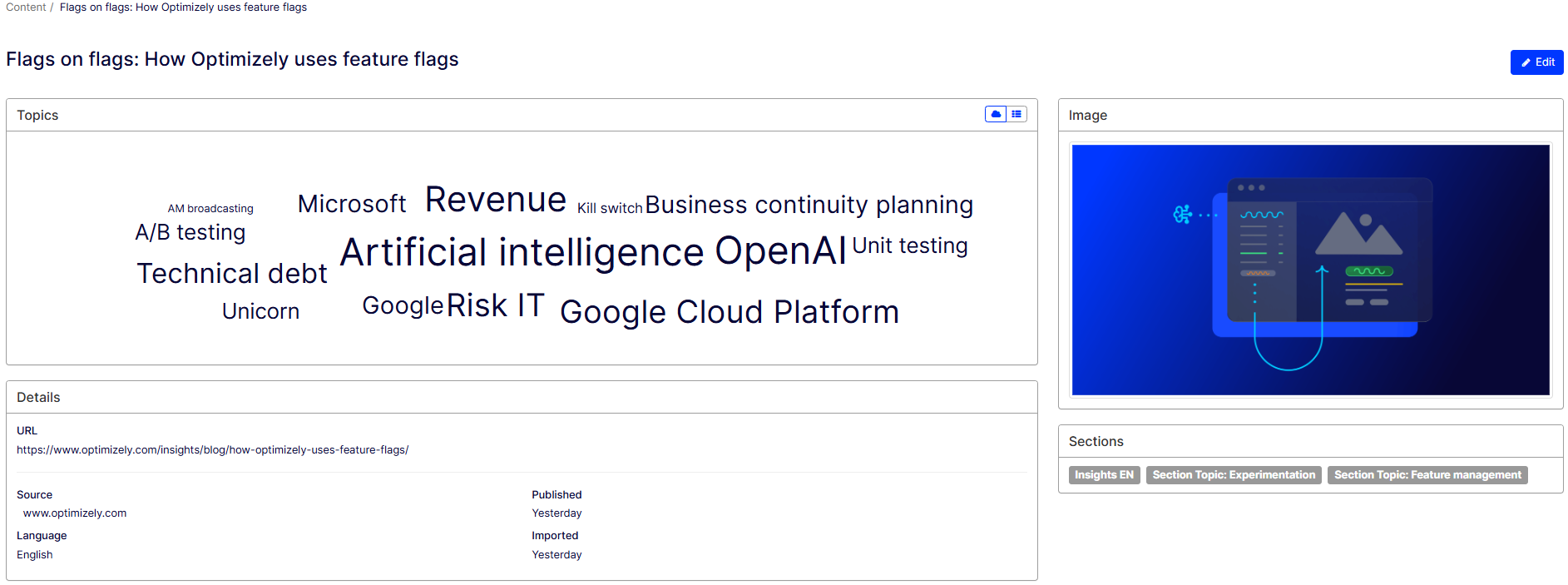
The following example displays topics automatically generated from a single piece of content using NLP:
What you can do with Content Recommendations
Optimizely designed Content Recommendations to help marketers deliver tailored customer experience and increase end-user engagement. You can do the following using Content Recommendations:
- Get real-time engagement insights – Performs topic analysis of a website's content and provides insights to show editors what topics resonate most with readers, making it easier to plan and create the next piece of content. You can also track how their interests evolve over time.
- Generate content recommendations – Interest profiles are used to generate content recommendations such as articles, blogs, and rich text pages. The system also supports PDFs with additional integration. You can serve Content Recommendations on both the web and through emails. As users continue engaging with the content, the recommendations dynamically adjust to reflect their evolving interests.
- Conduct real-time content audit – Provides insights into your content landscape that is automatically tagged and based on NLP capabilities. You can access data on personal preferences and campaign engagement for each visitor across multiple channels.
Use Content Recommendations dashboards
In Content Recommendations, you can access multiple dashboards to analyze content metrics, monitor visitor interactions, view topic performance, and evaluate the effectiveness of your recommendations.
-
Content Dashboard – Displays an overview of the number of content items imported by Content Recommendations, the number of top Topics generated by NLP, and the average number of topics per content item. The dashboard also displays top Sources and top Sections. You can use this data to reduce clutter and maintain a more focused content strategy.
-
Insight Dashboard – Displays the number of interactions per unique visitor over time, as well as the top Topics, Content, Sections, and Sources with which users are engaging. It also displays information on UTM referrer data.
-
Topic Performance – The Topic Performance view displays a graph of Volume versus Uniques and plots topics for easy analysis. You can use this dashboard to track and analyze visitor interactions with your site.
- Engage Dashboard – Displays the performance of web or email Deliveries. You can also view the number of the click-through rates (CTR) of unpersonalized and personalized recommendations served to customers. and compare the data between the two. You can use this dashboard to analyze conversion performance of recommendations, provided you use Goals.
Commonly used terms in Content Recommendations
- Sources – Origins of the content ingested into the system, such as a website or an RSS feed. This is usually your website or host domain, like www.optimizely.com.
- Content item – A piece of text-based content, like a webpage, with an associated identifier (such as a URL). Content items can be articles, blogs, and other rich text pages. A content item can contain a large number of Topics. For example, if you search for Insurance, Content Recommendations finds the different content items containing the topic. These content items can contain additional topics other than Insurance.
-
Topics – An indexed subject (like Brand, Rentals, or Artificial Intelligence) extracted from a content item. A topic is weighted (prioritized according to different levels of importance) based on the following criteria:
- The frequency at which a topic displays within a content item.
- The position of a topic in a content item.
- Sections – A content category defined by the parameters in the assigned Flow. You must use sections for content pooling when configuring recommendation widgets through deliveries. You can also use sections for filtering in dashboards.
- Flows – A set of rules designed to efficiently categorize content items into sections, based on content items attributes, including metadata, URL structure, language, source, and any additional custom metadata.
- Deliveries – Delivery widgets are used to serve recommendations on web or email. You can configure a delivery widget to generate personalized recommendations from one or more sections of content items. An API delivery can help you configure the content that will be returned based on the direct API call.
- Goals – A set of desired actions for individuals to undertake, such as completing a form, requesting demos, or downloading resources, which help assess a visitor's level of interest in specific content.
- Session – A period of continuous activity by an individual visitor on their website. After 30 minutes of inactivity, the tracking session cookie expires.
- Uniques – Page views or interactions performed by an individual visitor.
- Volume – The number of content items that contain a topic.
- Interaction – The number of page views Content Recommendations can import.
- Ingestion – The process of gathering topics for analysis. For example, if you add a URL to your website where you have implemented Content Recommendations, that content is ingested into the system. If content changes after it is ingested, you can reprocess the content.
Next steps
- Get started with Content Recommendations – Configure Content Recommendations.
Please sign in to leave a comment.